
Can You Put a Laptop in Checked Luggage? Rules and Risks
Table of Contents
Yes, you can technically put a laptop in your checked baggage. The TSA and FAA don't ban it outright.
Quick Answer
-
Keep your laptop in your carry-on or personal item whenever possible.
-
A laptop with an installed battery may generally be checked only when it is completely powered off, protected from damage, and secured against accidental activation.
-
Spare batteries, power banks, and battery-powered chargers must remain in your carry-on.
-
Check your airline’s current policy before flying, especially if the laptop has a large battery.
This question usually comes up when carry-on space runs out, an airline enforces strict size limits, or a bag ends up gate-checked at the last minute. In those moments, it's easy to assume that as long as the laptop fits, it's fine to check.
But that assumption misses the real risk. Even though checking a laptop is technically allowed, lithium-ion batteries can overheat or catch fire, and a checked bag is the worst place for that to happen since nobody can react until the plane lands. Damage and theft are common problems too.
This article walks through why airlines and the TSA discourage checking a laptop, what the actual rules say, how to pack one safely if you have no other choice, and what to do if your carry-on gets gate-checked without warning.
Why Airlines and the TSA Discourage Checking a Laptop
Checked bags go through rough handling. They get tossed onto conveyor belts, stacked in cargo holds, and thrown around by baggage crews who are moving fast to hit a schedule. If you pack a laptop in a checked bag, it isn't the only thing at risk down there. It's also sitting in a space where, if something goes wrong, nobody can react until the plane lands.
The Fire Risk from Lithium Batteries
Laptops run on lithium-ion batteries, and lithium-ion batteries can catch fire if they get damaged, crushed, or short-circuited. In the cabin, flight attendants are trained to spot the warning signs and handle a battery fire fast. In the cargo hold, nobody notices until it's already a problem. This is exactly why the FAA and TSA push so hard for laptops, phones, and other battery-powered devices to stay with you in the cabin instead of riding in the belly of the plane.
This isn't just a theoretical concern, either. There have been real incidents of overheating batteries causing fires and emergency evacuations on commercial flights, which is part of why the rules around lithium batteries have gotten stricter in recent years.
The Risk of Damage or Theft
Even if fire isn't a concern for you, plain old damage is. Checked bags get dropped, squeezed under other luggage, and occasionally opened for inspection. A laptop without a hard case or padding can crack, and a screen can get crushed under the weight of everything else in the bag. A padded laptop backpack protects against this kind of impact far better than a slot inside a packed suitcase.
Theft is the other issue. Checked luggage passes through more hands than a carry-on ever does, and laptops are small, valuable, and easy to slip out of a bag. If your laptop goes missing from checked luggage, getting it back is far less likely than if it never left your side.

What the Rules Actually Say
The rules around laptops and batteries can sound confusing because there are two separate things being regulated: the device itself, and any batteries that aren't attached to it.
Laptops Must Be Powered Off in Checked Bags
If you do check a laptop, it has to be completely powered off, not just asleep or in hibernation mode. A laptop that's still partially on can heat up or activate on its own inside a packed bag, which is exactly the kind of accidental trigger that leads to overheating. Airlines expect the device to be shut down all the way, with no chance of it turning on by itself during the flight.
Spare Batteries and Power Banks Must Stay in Your Carry On
Here's the part people miss most often. A regular wired laptop charger, the power brick and cord you plug into the wall, has no battery inside it, so it's fine to pack in either your carry-on or your checked bag. What isn't fine is anything that stores power on its own. As of 2025, the TSA prohibits loose lithium-ion batteries, power banks, and portable chargers with a built-in battery from checked luggage entirely. That means any spare laptop battery, power bank, or battery-powered portable charger needs to go in your carry-on bag, no exceptions. This rule exists because a loose battery is more likely to short-circuit than one that's sealed inside a device.
How to Pack a Laptop in Checked Luggage If You Must
Sometimes you don't have a choice. Maybe your carry-on is already full, or your airline has strict size limits and something has to give. If you're going to check your laptop anyway, here's how to do it as safely as possible.
Protect It from Impact
Use a padded laptop sleeve or a hard-shell case, not just a bag or a laptop compartment inside a regular suitcase. Wrap it in clothing on all sides if you don't have a dedicated case, so it isn't sitting directly against the hard walls of your luggage. Pack it toward the center of the bag, away from the outer edges where most impact happens.
Separate the Battery Accessories
Take out any spare battery and any portable power bank before you check the bag. These need to travel in your carry-on. Your regular wall charger and cord can stay in the checked bag if you're short on carry-on space, since it has no battery of its own.
What Happens If Your Carry On Gets Gate Checked
This is the scenario that catches a lot of travelers off guard. If your flight is full and your carry-on gets gate-checked at the last minute, you usually can't reorganize your bag on the spot. Airline staff will typically ask you to pull out any loose batteries, power banks, or battery-powered chargers before your bag goes into the cargo hold. Your laptop, if it's powered off, and your regular wall charger can generally stay in the bag.
The best way to handle this is to plan for it before you even get to the gate. Keep any spare batteries and power banks in an outer pocket of your carry-on where you can grab them in seconds, rather than buried at the bottom under everything else. If your flight has a history of overselling carry-on space or you're flying a smaller regional jet, treat gate-checking as a real possibility and pack accordingly.
Checking a High Performance or Gaming Laptop
Gaming laptops and other high-performance machines often have bigger, more powerful batteries than a standard laptop, and that changes the rules. Batteries are measured in watt-hours, and most everyday laptops fall well under the 100 watt-hour limit that doesn't need any special approval. Bigger batteries, in the 101 to 160 watt-hour range, need permission from the airline ahead of time and are limited to two per person. Anything over 160 watt-hours generally isn't allowed on a passenger flight at all.
If you're not sure where your laptop's battery falls, check the label on the battery itself or the manufacturer's spec sheet before you fly. It's a quick check that can save you a headache at the airport, and it matters even more if you're checking the device rather than carrying it on.
What Happens If You Break the Rules
If you check a battery accessory that isn't allowed, like a spare battery or a battery-powered charger, the most likely outcome is that it gets pulled during screening and you either lose it or have to go back and remove it from your bag before it's cleared to fly. In rarer cases, an improperly packed device or battery can delay your bag or draw extra scrutiny from security. It's not usually a fine or a major penalty, but it can mean a delayed flight, a confiscated item, or an inconvenient trip back to the check-in counter.
Better Alternatives to Checking Your Laptop
The simplest fix is also the most effective one: keep your laptop with you in your carry-on or personal item whenever you can. If space is the real problem, here are a few ways around it.
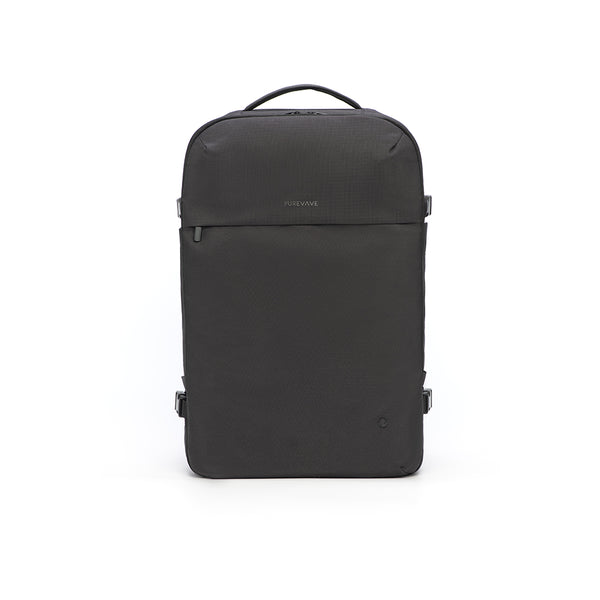
A roomy laptop backpack solves this problem well. Look for one built as a proper personal item, with a padded compartment that fits laptops up to 17 inches and enough room left over for a change of clothes, cables, and everything else you'd normally throw in a carry-on.
The Purevave Large Travel Carry-on Backpack is a good example of this style. It's sized to work as your personal item under the seat, has a dedicated padded laptop compartment, and still leaves enough space for a weekend's worth of gear, so your laptop never has to go anywhere near the cargo hold.
If you're traveling with a lot of gear, consider shipping the laptop ahead to your destination through a service with tracking and insurance. Backing up your files to the cloud before you fly also means that even in a worst-case scenario, your data isn't gone even if the laptop is damaged or lost.

Before You Fly Checklist
-
Keep your laptop in your carry-on or personal item if at all possible.
-
If you must check it, power it down completely before packing.
-
Pack it in a padded case, positioned away from the outer edges of your bag.
-
Remove any spare battery and power bank, and pack them in your carry-on. A regular wired charger can go in either bag.
-
Check your laptop's watt-hour rating if it's a gaming or high-performance model.
-
Back up your files to the cloud before you leave.
-
Keep spare batteries and power banks in an easy-to-reach pocket in case your carry-on gets gate-checked.
Final Thoughts
Checking a laptop isn't against the rules, but it isn't the safest choice either. Between the fire risk from lithium batteries and the chance of damage or theft in the cargo hold, keeping your laptop with you in the cabin is almost always the better call. If you ever have no other option, power it down completely, pad it well, and keep any spare battery or power bank in your carry-on.
The easiest way to avoid the question altogether is to make sure your laptop never has to leave your side in the first place. A good laptop backpack doubles as your personal item, keeping your device padded and within reach instead of buried in checked luggage. Purevave makes a solid lineup built for exactly this kind of travel, so you can skip the whole checked laptop question for good.
FAQs
Can I put a laptop in checked baggage on international flights?
The general rule is similar worldwide, since most countries follow IATA guidelines that closely match TSA and FAA rules. That said, individual airlines and countries can have their own extra restrictions, so it's worth checking your specific airline's policy before an international flight.
Does my laptop battery need to be under a certain size to fly?
Most laptop batteries fall under 100 watt-hours and don't need any special approval. If your battery is between 101 and 160 watt-hours, you'll need airline approval ahead of time. Anything above 160 watt-hours typically isn't allowed on passenger flights.
Will TSA take my laptop out of checked luggage to inspect it?
TSA does screen checked bags, and if something looks unusual on the scan, they may open the bag to inspect it. This is another reason to keep your laptop powered off and clearly visible rather than buried under other items.
Is it safe to check an old laptop with a swollen battery?
No. A swollen or damaged battery is far more likely to overheat or catch fire, and it shouldn't fly at all, whether it's in a carry-on or a checked bag. If your battery looks swollen or the laptop feels unusually warm, have it checked or replaced before you travel.
Does travel insurance cover a laptop lost or damaged in checked luggage?
It depends on your policy. Some travel insurance plans cover electronics in checked luggage, while others exclude them or cap the payout well below the laptop's value. Check your policy's fine print, and consider a separate electronics or homeowner's policy rider if you travel with an expensive device often.
More reading:
Is a Backpack a Personal Item? Airline Rules Explained
What Features to Look for in a Laptop Backpack for Work & Travel